
Cortex decision memory
Cortex remembers WHY: decisions, bans, and contracts, recalled and verified through five tools exposed by the normal memtrace mcp server — active by default on every plan.
Cortex is Memtrace's decision memory: it remembers why code looks the way it does — the decisions, bans, and conventions behind it — separately from the code graph that tracks what the code is. It's active on every plan by default; there's no dev flag or cloud grant standing between you and it.
Overview#
Where the main graph answers "what calls this?" or "what changed?", Cortex answers "was this decided on purpose?", "did that decision hold?", and "what governs this symbol?". It surfaces decisions captured from your episode history, not from re-reading source at query time — so recall is fast and the provenance trail is explicit.
The five decision-memory tools#
| Tool | Purpose |
|---|---|
recall_decision | Free-text ranked decision recall over the Decision/Conversation lanes. An empty or unknown query returns an honest CannotProve rather than a fabricated answer. |
verify_intent | Did a decision hold across its arc? Returns Held, ViolatedAt, or CannotProve. |
get_arc | The episodic arc implementing a decision — the episodes reachable by Produced/DerivedFrom edges, or CannotProve when there is no visible implementing episode. |
why_is_this_here | The governing decision/conversation lineage of a symbol — its Governs/Produced provenance. |
governing_contracts | The Contract nodes that constrain a symbol, or an honest CannotProve when none apply. |
verify_intent and get_arc both take a decision_id — the id returned by recall_decision — not a symbol name. Recall a decision first, then verify or trace its arc using the id it gives back. Passing a symbol name where a decision_id is expected is a common misuse.
Recall is scoped to your current workspace root, so decisions from an unrelated repository never bleed into results.
Sidecar architecture#
When Cortex is active, the workspace owner boots one local decision-memory sidecar. That owner is usually memtrace start, but the first standalone memtrace mcp client can own the workspace when no daemon is already running. memcortex-daemon owns capture, ingest, and the local decision-query endpoint. The public agent interface remains the ordinary memtrace mcp server: it registers the five tools above and proxies each call directly to the daemon's local IPC endpoint.
Do not point an MCP client at a filesystem path to memcortex-mcp, and do not add a second Cortex MCP entry. Configure command="memtrace", args=["mcp"] once. The five Cortex tools then appear in that server's tools/list. If the local Cortex endpoint is unavailable, the tools return an explicit unavailable result while the rest of Memtrace keeps working. New adapter builds exit before opening the Cortex store unless standalone development is explicitly enabled.
Local IPC is selected automatically: Unix-domain sockets on macOS/Linux and named pipes on Windows. There is no transport flag to set in the MCP client. memtrace mcp attaches to an existing compatible owner when one is running; otherwise it establishes MemDB and Cortex itself before serving the client session.
Aletheia: the decision-quality gate#
Distinguishing a real engineering decision from ordinary conversational noise is the hard part of decision memory — and it's the part Cortex doesn't outsource to a prompt. Aletheia is Memtrace's own fine-tuned classifier: a small encoder model trained specifically to score whether a captured candidate is a decision worth remembering, run entirely on your machine.
Capture is deliberately generous — the ingest loop favors recall over precision, so it captures more candidates than are really decisions. Aletheia is what cleans that up. During memcortex-daemon's idle consolidation pass (the dashboard's dreaming panel shows this running), it scores every eligible, freshly-captured decision candidate and records a verdict in gate_verdicts.json. Candidates remain in the append-only graph; the recall path consults those verdicts and omits candidates classified as noise from tool results. Governance-origin decisions are exempt from this learned gate.
| Spec | Detail |
|---|---|
| Architecture | Fine-tuned microsoft/deberta-v3-large (435M params), full fine-tune |
| Runs | Fully on-device — no network call, no cloud inference |
| Footprint | INT8 ONNX, ~642 MB on disk, ~1.2 GB resident in memory |
| Ships to | ~/.memtrace/models/aletheia-1.5/ |
| Trained on | 24,895 multi-judge-labeled examples — commit subjects and real turns from AI-coding sessions |
| Held-out accuracy | 0.933 conversational AUC |
Governance-sourced decisions — anything ingested via memtrace govern from an ADR or standing rule — skip this gate entirely. Those were deliberately authored as rules, not organic conversation; they're not the kind of noise Aletheia exists to catch.
If the model can't load for any reason, Cortex doesn't silently drop the candidate — it keeps it. A missing or failed classifier degrades to more permissive behavior, never to data loss.
Universal by default#
Cortex defaults to active on every plan — community included. There's no dev flag, no cloud entitlement grant, and no paywall bit standing in front of it; a cloud heartbeat can still adjust an optional decision-count cap (uncapped when unset), and usage is metered per retrieval, but the capability itself is not gated.
| Variable | Default | Description |
|---|---|---|
MEMTRACE_CORTEX | — | Local opt-out. Set to off to disable Cortex entirely for this machine — the sidecars won't spawn and calls to the five registered tools return unavailable. This is the only lever that turns Cortex off; the persisted opt-out also survives in ~/.memtrace/cortex.json. |
Governance intake#
Governance intake is in beta.
Governance intake points Memtrace at ADRs, standing rules, and agent-rule files so Cortex can classify and ingest them as governing decisions. The non-interactive entry point is memtrace govern:
$ memtrace govern docs/adr
# sweep a directory recursively for *.md/*.mdc plus .cursorrules/.windsurfrules

$ memtrace govern docs/adr/0007-use-postgres.md
# classify a single file

$ memtrace govern 'docs/**/*.md' --exclude drafts,archive
# classify a glob, dropping any path containing "drafts" or "archive"
memtrace govern classifies through Cortex's real classification oracle over local IPC. Without --accept-all, it is a read-only, non-interactive preview that is safe to run in CI. With --accept-all, it persists every governance candidate shown in the preview. The interactive review and confirm step lives in the dashboard's Cortex tab, Governance sub-view (open localhost:3030 and switch to the Cortex tab). There is no separate standalone governance server or UI — the review screen lives inside the main dashboard.
A plain memtrace govern docs/adr run previews the classification and does not add it to decision memory. Add --accept-all to persist the governance candidates shown in the preview, confirm candidates in the dashboard, or persist one exact assertion with memtrace govern add/edit. None of these operations rebuilds the Cortex store.
memtrace govern requires the Cortex sidecar to be running — start it with memtrace start first. Without it, the command reports that it cannot classify accurately rather than falling back to a lower-quality local guess.
For a doc the classifier misses, gets wrong, or that lives outside the zero-config sweep entirely, memtrace govern add/edit bypasses classification altogether and directly asserts a doc's governance category, guidance, and scope — see the govern CLI reference for the full flag set. The Governance sub-view mirrors this: above its review/confirm table is a collapsible "+ Add or edit a governance doc manually" form with the same fields (path, category, guidance, scope, ban), for making the same manual assertion without leaving the dashboard.
Automatic Cortex capture discovers Git-tracked documents. A generated, ignored, or untracked ADR is not pulled into decision memory just because it sits under the repo root. A targeted memtrace govern <path> previews it; add --accept-all to persist the classified result. Use govern add/edit or the dashboard to override that classification. Every write canonicalizes the file and requires it to resolve beneath the Git root; copy an off-repo symlink, junction, or mounted document into a real in-repo path before adding it.
Status, refresh, and recovery#
The code graph and Cortex use different stores and different lifecycle paths. memtrace status confirms the workspace owner and MemDB graph, but it does not by itself prove that Cortex can answer. With memtrace start running, inspect Cortex's own status endpoint or open the Cortex tab:
# macOS / Linux
$ curl -s http://localhost:3030/api/cortex/status

# Windows PowerShell
PS> Invoke-RestMethod http://localhost:3030/api/cortex/status

# Workspace/runtime evidence (does not replace the Cortex check)
$ memtrace status --json
A healthy Cortex response has entitled: true, daemonRunning: true, supervisorRunning: true, and a positive sidecarChildren count. daemonAvailable proves the local endpoint answered its latest probe; it can briefly be false while the serial daemon is busy with another recall. Wait for snapshotState: "fresh" before interpreting the counts: only a fresh totalCount: 0 confirms an empty machine-global store. loading means the first durable scan is still running, and stale reports the last completed snapshot while Cortex refreshes it in the background. None of those counts describe the separate code index.
If the endpoint is unavailable, restart the workspace owner, then restart/reconnect the MCP client:
$ memtrace stop
$ memtrace start
# Then restart the IDE/agent MCP connection and call recall_decision
# through the existing "memtrace" MCP server.
Poll the status endpoint until snapshotState is fresh, then test with a distinctive phrase from a known decision using recall_decision. A large existing Cortex store can take several seconds to hydrate after a cold start. If recall returns a decision id, pass that id to get_arc or verify_intent; those tools do not accept a symbol name. For governance docs, first preview with memtrace govern <path>, then persist with --accept-all, the dashboard, or memtrace govern add for one exact assertion before testing recall.
memtrace index, memtrace index --clear, index_directory with clear_existing: true, and memtrace reset rebuild or clear the MemDB code graph only. They do not rebuild Cortex's separate ~/.memtrace/cortex-store, so repeating them cannot repair an empty Cortex query. Capture a redacted report with memtrace cortex debug. If restart and explicit governance confirmation still fail, run memtrace cortex reset --yes: it writes a pre-reset report, stops the runtime, and archives stale runtime markers plus learned recall-gate verdicts. It preserves the durable graph, ingest offset, governance lifecycle inventory, raw episodes, capture cursors, and source documents. Then run memtrace start and reconnect the agent's existing memtrace mcp connection. See the Cortex CLI reference for flags, report contents, and the exact preservation boundary.
From episode to recall#
Cortex tab (dashboard)#
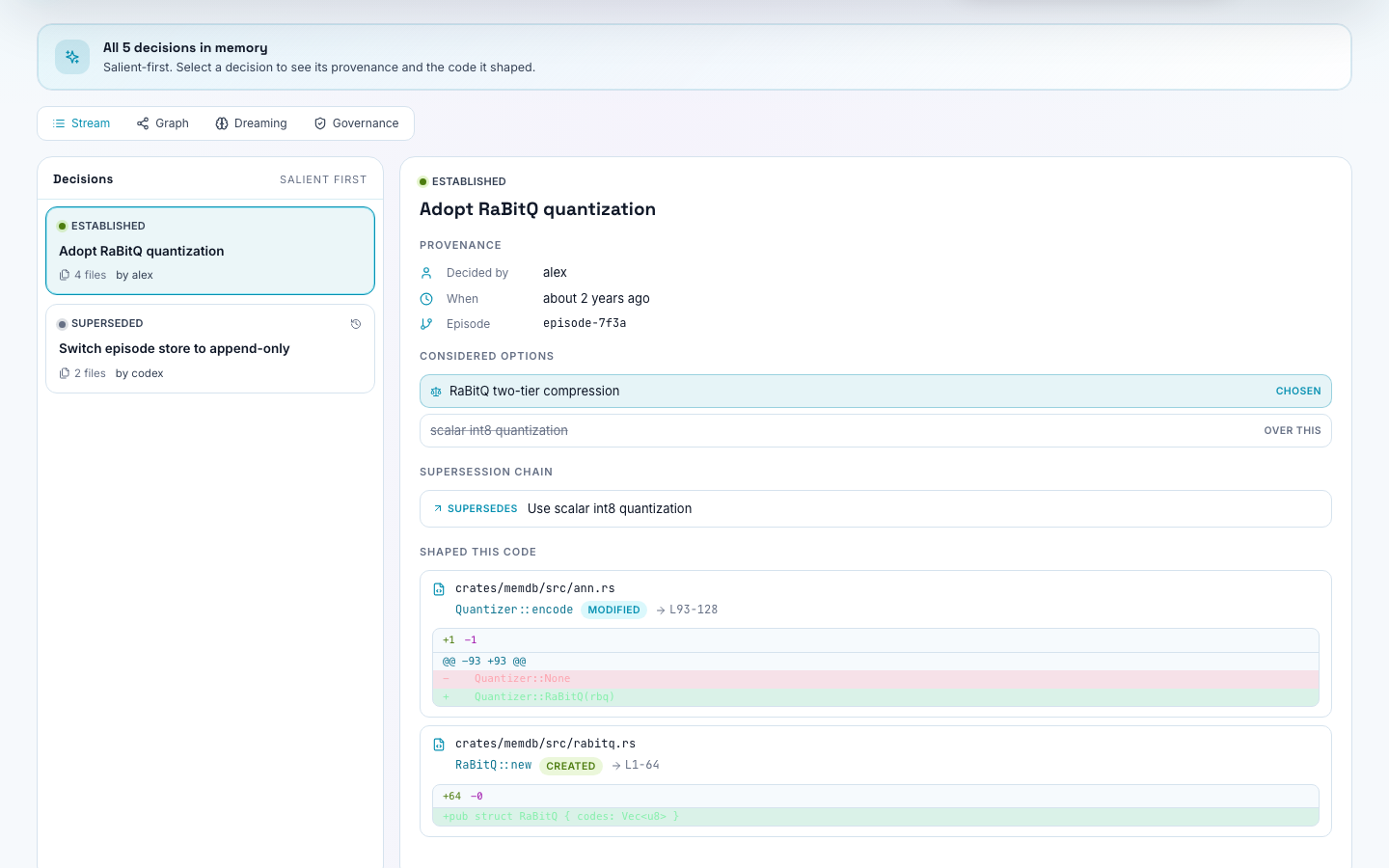
The Cortex tab in the :3030 dashboard is a dedicated decision-memory workspace, distinct from the Explorer's code/git graph. It renders a decision stream, a decision detail view, a timeline, a dedicated Cortex graph, a diff view, a dreaming panel, and a cap banner, backed by its own 3D scene — plus the Governance sub-view described above.
Cortex vs. Graph
The dashboard's topbar has a Cortex toggle that's separate from the Graph/Explorer view: Graph is code and git history; Cortex is decision memory. They're two different lenses over the same underlying work.